When businesses move infrastructure into a data center, security becomes one of the most important parts of the decision. Servers, storage systems, network equipment, backup infrastructure, and business applications often support sensitive operations. If the facility is not properly secured, the business may face risks that go beyond downtime.
A secure data center facility should protect infrastructure from unauthorized access, environmental issues, power failures, connectivity disruptions, and operational gaps. Security is not only about locked doors. It includes physical controls, access procedures, monitoring, documentation, redundancy, remote support, and provider accountability.
For businesses evaluating colocation, data center hosting, private cages, private suites, connectivity, or disaster recovery environments, facility security should be reviewed carefully before signing an agreement.
What Is a Secure Data Center Facility?
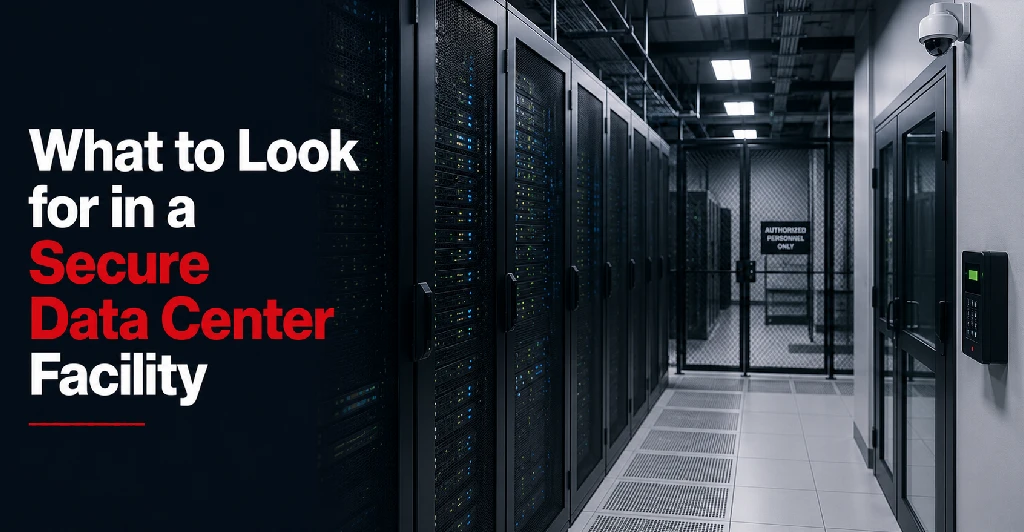
A secure data center facility is a purpose-built environment designed to protect IT infrastructure from physical, operational, and environmental risks.
This may include:
- Controlled facility access
- Visitor verification
- Surveillance systems
- Secure rack, cage, or suite access
- Environmental monitoring
- Redundant power
- Cooling systems
- Fire detection and suppression
- Network security options
- Documented procedures
- Remote hands authorization
- Vendor access controls
- Compliance support
The goal is to create an environment where critical infrastructure is protected, monitored, and supported.
A secure facility should help reduce the risk of unauthorized access, accidental disruption, equipment damage, and infrastructure downtime.
Why Data Center Security Matters
Business infrastructure often supports systems that are essential to daily operations.
This may include:
- Customer-facing applications
- Healthcare systems
- Financial platforms
- Manufacturing systems
- Internal business applications
- Backup systems
- Disaster recovery infrastructure
- Network equipment
- Remote workforce access
- Multi-location connectivity
If infrastructure is not secure, the business may face operational, financial, compliance, and reputational risk. Knowing what makes a secure hosting environment helps businesses protect both equipment and continuity. It provides a stronger environment than most office server rooms, closets, or small internal IT spaces.
Physical Security
Physical security is one of the most visible parts of data center security.
A secure facility should control who can enter the building, who can access the data floor, and who can interact with customer equipment.
Physical security may include:
- Controlled entry points
- Locked facility access
- Security cameras
- Visitor check-in procedures
- Badge access
- Access logs
- Staff verification
- Vendor escorting
- Cabinet locks
- Private cages
- Private suites
- Restricted areas
Businesses should ask how the provider controls access from the outside of the building all the way to the rack, cage, or suite where equipment is located.
Security should exist in layers, not only at one door.
Access Control Procedures
Access control is about more than physical locks.
A secure data center should have documented procedures for approving, tracking, and limiting access.
Businesses should review:
- Who is allowed to access the facility
- How access requests are submitted
- How identities are verified
- Whether access is logged
- Whether temporary access is allowed
- How vendor access is handled
- How emergency access works
- How former employees are removed from access lists
- How remote hands requests are authorized
- Whether access records are available for audits
Access control is especially important for businesses with compliance requirements or sensitive infrastructure.
The provider should have clear procedures that reduce the risk of unauthorized or undocumented access.
Visitor and Vendor Management
Many businesses need vendors or service providers to access infrastructure occasionally.
This may include:
- Hardware vendors
- Network providers
- Managed IT providers
- Security consultants
- Application vendors
- Cabling contractors
- Auditors
- Internal IT teams
A secure facility should have a process for visitor and vendor management.
Businesses should ask:
- Are visitors required to check in?
- Are visitors escorted?
- Are vendor visits pre-approved?
- Are access times logged?
- Can vendor access be limited to specific areas?
- Who can authorize vendor access?
- Are visitor records available if needed?
- How are emergency vendor visits handled?
Vendor management matters because third-party access can create risk if it is not properly controlled.
Surveillance and Monitoring
Surveillance helps protect the facility and support accountability.
A secure data center may use camera systems to monitor entry points, corridors, data halls, cages, loading areas, and other sensitive zones.
Businesses should ask:
- Are security cameras used?
- What areas are monitored?
- How long is footage retained?
- Who can access footage?
- Are cameras monitored in real time?
- Are private cage or suite areas covered?
- Are access events correlated with video records?
Surveillance does not replace access control, but it supports security review, incident investigation, and deterrence.
Rack, Cabinet, Cage, and Suite Security
Security needs vary depending on the type of space being used.
A business using shared rack space may need cabinet-level locks and controlled access procedures. A business using a full cabinet may want dedicated locked rack access. A business with larger or more sensitive infrastructure may need a private cage or suite.
Data center space options may include:
- Shared rack space
- Dedicated cabinet
- Full rack
- Private cage
- Private suite
The more sensitive or critical the infrastructure, the more carefully physical separation should be considered.
Private cages and suites can provide stronger control for businesses that need dedicated infrastructure space, restricted access, and more organized security documentation.
The more sensitive or critical the infrastructure, the more carefully physical separation should be considered. Evaluating a shared rack vs private cage layout can clarify your space configuration needs, while reviewing the distinction between a private cage vs private suite provides deeper separation options. Understanding when to move from shared rack to private cage can provide stronger control for businesses that need dedicated infrastructure space, restricted access, and more organized security documentation.
Security for Colocation Customers
In colocation, the customer usually owns or controls the hardware. The data center provides the secure facility environment, power, cooling, physical access controls, and connectivity options.
This means colocation security is shared between the provider and the customer.
The data center is responsible for protecting the facility environment. The customer is usually responsible for securing its own servers, operating systems, applications, data, firewalls, access permissions, and backups.
Colocation customers should evaluate:
- Facility access control
- Rack or cage security
- Remote hands authorization
- Carrier access procedures
- Visitor logs
- Physical surveillance
- Power and cooling reliability
- Connectivity options
- Support response procedures
- Compliance documentation
A secure colocation facility should make it easier for businesses to protect physical infrastructure while maintaining control over their systems.
Security for Data Center Hosting
Data center hosting may involve more provider responsibility depending on the service.
In a hosting environment, the provider may supply infrastructure, servers, network resources, management support, or monitoring. The exact responsibilities depend on whether the service is dedicated hosting, managed hosting, or infrastructure hosting.
Businesses should review:
- Who manages the hardware
- Who manages the operating system
- Who manages backups
- Who applies patches
- Who monitors the environment
- Who responds to incidents
- What security controls are included
- What responsibilities remain with the customer
A secure hosting facility should provide both physical security and clear responsibility boundaries.
Fire Detection and Suppression
Fire protection is an important part of facility security and business continuity.
A secure data center should have systems designed to detect and respond to fire risk without unnecessarily damaging IT equipment.
Businesses should ask:
- What fire detection systems are in place?
- What fire suppression method is used?
- Are systems tested and maintained?
- Are procedures documented?
- Are staff trained for emergency response?
- How are customers notified of facility incidents?
Fire protection is often overlooked during provider evaluation, but it directly affects infrastructure safety.
Environmental Monitoring
Security also includes protecting equipment from environmental conditions.
A secure data center should monitor:
- Temperature
- Humidity
- Airflow
- Water leaks
- Power conditions
- Cooling performance
- Fire alerts
- Facility alarms
Environmental monitoring helps detect problems before they damage equipment or cause downtime.
Businesses should ask how environmental alerts are handled, who responds, and whether monitoring is active around the clock.
Power Redundancy and Security
Power reliability is part of facility protection.
A secure data center should protect infrastructure from power interruptions through systems such as:
- Utility power feeds
- UPS systems
- Battery backup
- Backup generators
- Power distribution systems
- Redundant power paths
- Rack-level power monitoring
- Preventive maintenance
If power is not reliable, infrastructure is not truly protected.
Businesses should review whether the provider offers redundant power feeds, backup generators, power monitoring, and clear procedures during power events.
Cooling Redundancy and Equipment Protection
Cooling protects equipment from overheating.
A secure facility should have dedicated cooling systems, environmental monitoring, and cooling redundancy. This helps keep equipment within safe operating conditions.
Businesses should ask:
- Is cooling designed for data center workloads?
- Is cooling monitored?
- Are temperature and humidity controlled?
- Is cooling supported by backup power?
- Is there redundant cooling capacity?
- How are hot spots detected?
- How are cooling incidents handled?
Cooling is a security and reliability concern because equipment failure can occur if environmental conditions are not controlled.
Network and Connectivity Security
Connectivity is another important part of facility evaluation.
A secure data center should support reliable, controlled network access. This may include carrier-neutral connectivity, redundant network paths, cross-connects, private connections, and secure routing options.
Businesses should review:
- Carrier availability
- Cross-connect procedures
- Network redundancy options
- Physical security for network equipment
- Firewall placement
- Private connectivity options
- Cloud connectivity options
- Vendor access to network equipment
- Network maintenance communication
Connectivity should support uptime, security, and business continuity.
Carrier-Neutral Facilities and Security
A carrier-neutral facility allows businesses to choose from multiple network providers rather than being limited to one carrier.
This can support security and continuity by reducing dependency on a single provider.
Carrier-neutral connectivity may help businesses:
- Build redundant network paths
- Use multiple carriers
- Improve failover planning
- Support private network connections
- Connect branch offices
- Improve disaster recovery options
- Avoid single-carrier dependency
Businesses should still evaluate how carrier access, cross-connects, and network equipment are physically secured inside the facility.
Remote Hands Security
Remote hands support can be valuable, but it must be controlled carefully.
Remote hands means data center staff perform approved physical tasks on customer equipment. These tasks may include checking cables, rebooting equipment, replacing hardware, or assisting with troubleshooting.
Businesses should ask:
- Who can request remote hands support?
- How are requests verified?
- Are tasks documented?
- Are technicians trained?
- Can photos or status updates be provided?
- How is access to private cages or suites controlled?
- Are emergency requests handled differently?
- Are remote hands activities logged?
Remote hands should make infrastructure easier to operate without weakening access control.
Security Documentation
Documentation is an important part of data center security.
A secure provider should have documented procedures for access control, visitor management, incident response, maintenance, emergency response, remote hands support, and facility operations.
Businesses should ask whether documentation is available for:
- Access procedures
- Security policies
- Visitor logs
- Maintenance records
- Incident communication
- Remote hands requests
- Facility operations
- Compliance support
- Service level commitments
Documentation helps businesses understand how security works in practice, not just how it is described in sales materials.
Compliance Considerations
Businesses in regulated industries may need a data center facility that supports compliance expectations.
This may apply to:
- Healthcare
- Financial services
- Manufacturing
- Enterprise IT
- Insurance
- Legal services
- Government-related contractors
- Organizations with customer security requirements
Compliance needs may influence physical security, access logs, vendor control, backup planning, disaster recovery, and documentation.
A secure data center facility does not automatically make a business compliant. However, it can support compliance efforts by providing stronger controls, documentation, and infrastructure protection.
Security for Healthcare Organizations
Healthcare organizations often need to protect systems that support patient care, records, scheduling, imaging, communication, or billing.
A secure data center facility can help healthcare providers improve physical protection, uptime planning, backup infrastructure, and controlled access.
Healthcare organizations should review:
- Facility access controls
- Private cage or suite options
- Backup and disaster recovery support
- Environmental monitoring
- Security documentation
- Remote hands procedures
- Network redundancy
- Incident communication
- Compliance support
The facility should align with the organization’s internal security and compliance responsibilities.
Security for Financial Services Companies
Financial services companies often depend on infrastructure for customer data, internal applications, reporting systems, transaction support, and compliance-driven processes.
A secure data center facility may help support:
- Physical infrastructure protection
- Controlled access
- Stronger network redundancy
- Backup and recovery planning
- Audit support
- Private infrastructure space
- Documented security procedures
Financial services companies should carefully review access logs, provider responsibilities, SLA terms, remote hands authorization, and incident communication procedures.
Security for Manufacturing Businesses
Manufacturing companies may rely on infrastructure for ERP systems, logistics, inventory, plant operations, vendor coordination, and multi-location connectivity.
A secure data center can help protect these systems from office-level risks such as power interruptions, poor cooling, weak physical security, or limited connectivity.
Manufacturers should evaluate:
- Power redundancy
- Cooling reliability
- Connectivity redundancy
- Remote hands support
- Disaster recovery options
- Access control
- Multi-location network support
- Physical security
For manufacturing businesses, security is closely connected to operational continuity.
Security for Multi-Location Businesses
Businesses with multiple offices, clinics, warehouses, plants, or branches often need centralized infrastructure that is secure and available.
A secure data center can support:
- Centralized servers
- Private network connections
- Remote access
- Branch office connectivity
- Backup systems
- Disaster recovery infrastructure
- Security monitoring tools
- Multi-carrier connectivity
For multi-location organizations, the facility should be evaluated not only for physical security but also for network reliability and business continuity support.
Business Continuity and Facility Security
Security and business continuity are closely connected.
A facility may have strong access controls, but if power, cooling, and connectivity are weak, the business still faces risk. Similarly, a facility may have reliable infrastructure, but weak access controls can expose equipment to unauthorized activity.
A secure data center should support business continuity through:
- Physical security
- Redundant power
- Reliable cooling
- Network options
- Environmental monitoring
- Incident communication
- Remote support
- Disaster recovery planning
- Maintenance procedures
- Access documentation
The best facility security strategy protects both equipment and operations.
Data Center SLA and Security
The service level agreement (SLA) should be reviewed as part of security evaluation.
An SLA may define commitments around uptime, power availability, network availability, support response, maintenance notice, and service credits.
Businesses should ask:
- What uptime commitments are included?
- Does the SLA cover power?
- Does it cover network services?
- Are maintenance windows excluded?
- What response times are defined?
- How are incidents communicated?
- What happens if service levels are missed?
- What are the customer responsibilities?
A secure facility should offer clear commitments and clear boundaries.
Common Data Center Security Mistakes Businesses Make
Businesses often make mistakes when evaluating data center security.
Common mistakes include:
- Focusing only on price
- Assuming all data centers have the same security
- Not reviewing access control procedures
- Ignoring visitor and vendor management
- Overlooking remote hands authorization
- Not asking about surveillance
- Not reviewing power and cooling redundancy
- Forgetting disaster recovery needs
- Not checking compliance documentation
- Choosing too little physical separation
- Not planning for future growth
- Not clarifying provider vs customer responsibilities
These mistakes can create risk after the infrastructure is already moved.
Questions to Ask Before Choosing a Secure Data Center Facility
Before choosing a provider, ask:
- How is facility access controlled?
- Who can enter the data floor?
- Are access logs maintained?
- Are visitors escorted?
- How are vendors approved?
- Are security cameras used?
- Are racks, cages, or suites monitored?
- What private space options are available?
- How is remote hands support authorized?
- What fire detection and suppression systems are used?
- How is temperature and humidity monitored?
- What power redundancy is in place?
- What cooling redundancy is available?
- Is the facility carrier-neutral?
- What network redundancy options are available?
- What compliance documentation can be provided?
- How are incidents communicated?
- What does the SLA cover?
- What responsibilities remain with the customer?
- Can the facility support future growth?
These questions help businesses evaluate security beyond surface-level claims.
Secure Data Center Facility Checklist
When evaluating a secure data center facility, review:
- Controlled facility access
- Visitor verification
- Vendor access procedures
- Security cameras
- Access logs
- Rack or cabinet security
- Private cage options
- Private suite options
- Remote hands authorization
- Fire detection and suppression
- Temperature monitoring
- Humidity control
- Power redundancy
- Cooling redundancy
- Carrier-neutral connectivity
- Network redundancy
- Cross-connect procedures
- Compliance support
- SLA commitments
- Incident communication
- Maintenance procedures
- Disaster recovery options
- Future expansion capacity
This checklist helps businesses compare providers more carefully and choose a facility that supports infrastructure security, reliability, and growth.
How to Choose the Right Secure Facility
The right secure data center facility should match the business’s risk level.
A small company with limited infrastructure may need secure rack space, reliable power, and basic remote hands support. A healthcare provider may need stronger access documentation, backup planning, and private space. A financial services company may need more formal security controls, redundancy, and audit support. A manufacturer may need reliable connectivity and continuity for multiple locations.
The right choice depends on:
- Infrastructure importance
- Security requirements
- Compliance needs
- Uptime expectations
- Growth plans
- Connectivity requirements
- Budget
- Internal IT capacity
- Disaster recovery goals
A secure data center should reduce risk and make infrastructure easier to manage.
Build a More Secure Infrastructure Environment With Sierra Data Centers
Sierra Data Centers supports businesses with secure colocation, data center hosting, private cages, private suites, carrier-neutral connectivity, remote hands support, and disaster recovery planning across its professional data centers.
For businesses moving from office server rooms, expanding into private infrastructure, or planning a more reliable hosting environment, facility security should be one of the first priorities.
Sierra Data Centers can help organizations evaluate rack space, private cage options, power, cooling, connectivity, access control, and long-term infrastructure needs.
If your business is looking for a secure data center facility, you can contact us at Sierra Data Centers to help you plan an environment designed for reliability, security, and growth.